If you have been running a self-hosted app on AWS EC2 with Docker Compose, you know the upgrade path is where you keep getting bitten. Last night my container refused to start, and the error was the kind that makes you want to throw your laptop.
The log said:
corrupted migrations: expected previously executed migration
20260205T214213-add-settings-to-spaces to be at index 25
but 20250831T191600-add-group-sync-to-auth-providers was found in its place.
New migrations must always have a name that comes alphabetically after the
last executed migration.
Looks like a clear instruction, right? Insert the missing migration, sort alphabetically, done. Except — that was not the actual problem. Not even close. Let me tell you what actually happened.
The Symptom
The container kept crashing on boot. The error was thrown by Kysely’s migrator during onApplicationBootstrap. Postgres was reachable. Redis was reachable. The migration file existed in the image. The only thing that was "wrong" was the order check.
The First Wrong Assumption
I assumed — like any reasonable developer — that "alphabetically after the last executed migration" means alphabetical order by file name. I added the missing row into kysely_migration, restarted, and got the same error.
I tried again. Different index. Same error.
I tried cleaning up "duplicates". Same error.
I even pulled a fresh image, copied out the migrations folder, and confirmed it matched my repo byte-for-byte. 46 migration files on disk. 46 rows in the database. Everything aligned by ls | sort. Still the same error.
The Real Culprit
After about two hours of this, I finally went to the source. Kysely 0.28.17’s migrator.js has this in #getExecutedMigrations:
return (executedMigrations
  .sort((a, b) => {
    if (a.timestamp === b.timestamp) {
      return nameComparator(a.name, b.name);
    }
    return (new Date(a.timestamp).getTime() - new Date(b.timestamp).getTime());
  })
  .map((it) => it.name));
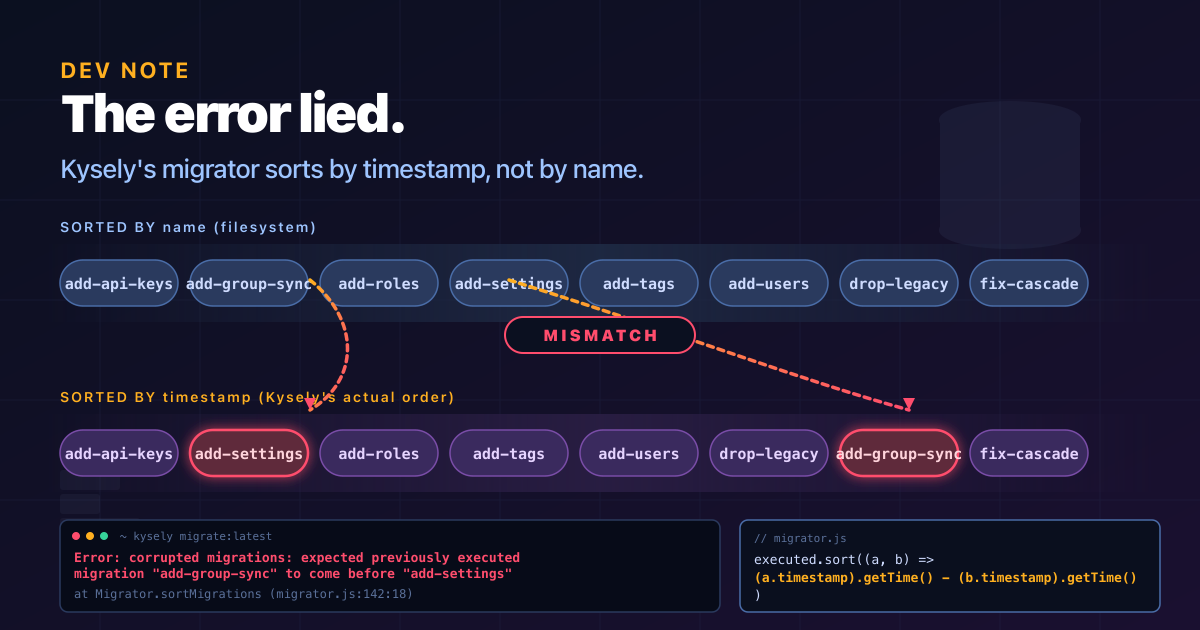
Read that carefully. The executed list is sorted by timestamp (parsed as a Date), not by name. The name is just a tiebreaker.
Meanwhile, the file-system list IS sorted by name. So Kysely walks two lists, both of length 46, sorted by different keys, and complains when they do not line up at the same index.
The two orderings only agree if every migration’s timestamp is monotonically increasing in the same order as its name. For filenames that follow a YYYYMMDDTHHMMSS-name.ts convention, the date prefix happens to be in alphabetical order, so as long as your timestamp mirrors the filename prefix, the two orderings line up.
Why My Initial Insert Failed
When I first patched the kysely_migration table, I used NOW() for the timestamp — because, you know, "when did this migration run" is a reasonable thing to record. That timestamp landed in June 2026, after most other rows. So Kysely sorted my row to a different position in timestamp order, but the file-system sort had it at yet another index. Kysely then complained about that position.
The error message you see — the specific index, the specific names — is just Kysely telling you "the row I expected at this index is not here." It is a symptom of the timestamp-name misalignment, not the cause.
The Fix
The trick is to derive each migration’s timestamp from the YYYYMMDDTHHMMSS prefix of its name. Format it as YYYY-MM-DDTHH:MM:SS.000Z. This way:
- Each timestamp is unique (every name has a unique prefix), so the tiebreaker is never invoked.
- The timestamp order is identical to the file-name order, so the two lists align perfectly.
The script I ran (executed from inside the running container so the DATABASE_URL env var was the source of truth) looks like this:
const rows = [
  ['20240324T085400-uuid_v7_fn', '2024-03-24T08:54:00.000Z'],
  ['20240324T085500-workspaces', '2024-03-24T08:55:00.000Z'],
  // ... 44 more rows
  ['20260509T121236-labels', '2026-05-09T12:12:36.000Z'],
];

for (const [name, ts] of rows) {
  await sql`
    INSERT INTO kysely_migration (name, timestamp)
    VALUES (${name}, ${ts})
    ON CONFLICT (name) DO UPDATE SET timestamp = EXCLUDED.timestamp
  `;
}
I ran it with ON CONFLICT DO UPDATE so it is safe to re-run, and used the running app container’s DATABASE_URL (via docker exec <container> node -e "...") so I was 100% hitting the right database. The script also dumped the result sorted the way Kysely sorts, so I could eyeball the order before restarting.
After that:
sudo docker compose restart <app-service>
sudo docker compose logs --tail 30 <app-service>
→ DatabaseMigrationService: No pending database migrations
App boots. Done.
Key Insight
In Kysely 0.28.17, the timestamp column is the primary sort key, not metadata. When you manually insert into kysely_migration to fix a corrupted state, the timestamp value must be derived from the name’s own YYYYMMDDTHHMMSS prefix, not from NOW() or from the original run_at. Otherwise the two orderings disagree and you get this misleading "corrupted migrations" error that points at the wrong index.
The error message says "alphabetically." It lies. It is chronologically sorted, with name as a fallback tiebreaker.
Practical Tips
- Always run diagnostic SQL from inside the running container, using its own
DATABASE_URLenv var. Do not trust your local.envif you have a composeenvironment:override — they often disagree. - When the error index keeps changing between restarts, that is a hint that something else is mutating the table. In my case it was a stale placeholder timestamp; in other cases it could be a second app instance pointed at the same DB, a cron job, or a backup-restore loop.
- The
kysely_migrationtable hasnameas PRIMARY KEY, so theON CONFLICT (name) DO UPDATEform is essential for idempotency. Without it, a re-run would either fail with a unique-constraint violation or — if you somehow dropped the PK — create duplicate rows that shift every subsequent index by one. - The file name in
kysely_migration.nameis the filename without the.tsextension. If your codebase has any filename with extra dots (e.g.20250729T213756-add-unaccent-..ts), strip just the.tssuffix; the inner dots stay in thenamecolumn. Easy to get wrong if you are hand-rolling the array.
Was It Worth Two Hours?
Yes. I now have a working prod stack, a much deeper understanding of Kysely’s internals than I ever wanted, and this article to save the next person the same trouble. If you hit the same error, the fix is the timestamp-from-name trick above. The lesson generalises: when a library’s error message and the actual sort algorithm disagree, go read the source.
Do you know? The Kysely issue tracker has issue #843 about this sort behaviour. The maintainers are aware. They kept it this way on purpose for ordering stability across migrator runs. Which is fine, until it bites you.
Stack: NestJS 11, Kysely 0.28.17, Postgres 18, Docker Compose on EC2 Ubuntu 24.04. Total downtime: ~2 hours. Headache: RM 0 (allergic to aspirin).
Leave a Reply
You must be logged in to post a comment.